Intelisense and Modules
In this post I will focus on two major updates in COPHASAL version 1.27.39: support for Intelisense and a shift towards modules and packages based scripting architecture. For a complete list of updates, please refer to the release notes in the user manual.
Modules and Packages
Modules are a way to organize code into reusable and maintainable units in Lua. A module is imported into other Lua scripts using the require function. A package is a collection of modules that are related to each other. There are many benefits to using modules in your projects, such as:
- Encapsulation: Modules can hide their internal implementation details and only expose a public interface to the outside world. This can help prevent naming conflicts and improve code readability.
- Reusability: Modules can be reused across different projects and scripts saveing time and effort in development.
- Maintainability: Modules can be added, updated and maintained independently of each other, which can make it easier to add new features without affecting other parts of the codebase.
- Organization: Modules can help organize code into logical units making it easier to navigate and understand the codebase.
As the core C++ engine becomes more stable and mature, some features and functionalities will be added as Lua modules while other performance critical aspects will be added as built-in features. It is likely that in the future some modules will be absorbed into the core engine as built-in features, while it has been realized that some features should have been implemented as modules from the beginning.
To start, a modules folder has been added along with a utility module for matrices. Here is a simple example demonstrating how to use the matrix utilities module to perform matrix manipulation.
local MU = require("utils.matrix_utilities")

local A = Matrix.new(3, 3) + 1.0 -- Create a 3x3 matrix filled with 1.0

local B = MU.top(A, 2) -- Get the top 2 rows of the matrix

print("Matrix A:")
print(A)
print("Top 2 rows of A (Matrix B):")
print(B)
Results in:
Matrix A:
1 1 1
1 1 1
1 1 1
Top 2 rows of A (Matrix B):
1 1 1
1 1 1
The module “matrix_utilities.lua” is located in the folder “modules/utils”. Note that the folder separator in the module name is a dot (.) instead of a slash (/). This way, modules can be organized in a hierarchical manner in subfolders. Another advantage of this approach is that the module gets compiled only once and is cached, so subsequent calls to require for the same module will be a simple table lookup.
Intelisense
The modules folder also contains the definition files for COPHASAL. With these definition files, your code editor can provide Intelisense features like code completion, syntax highlighting, and much more. Although the definition files can be used with any code editor, since I have tested them with VSCode, I will be demonstrating these Intelisense features using VSCode in the following example.
Editor Setup
The COPHASAL definition files are written in the LuaCATS/EmmyLua comments annotation format. Any language server that supports this format should be able to provide Intelisense features in your editor. In VSCode, you can use the “Lua Language Server” extension. Now, all that is needed is to tell the language server where the definition files are located. This is best done on a project basis, by placing a file named .luarc.json in the project folder. The bare minimum content of the .luarc.json file to point to the definition files is as follows:
{
  "workspace.library": [
      "C:/COPHASAL/modules",
  ],
}
The language server behavior can be further customized, of course. In fact, here is the complete content of the .luarc.json file I am using for my project:
{
  "runtime.version": "Lua 5.4", // COPHASAL uses Lua 5.4.6
  "runtime.pathStrict": true,

  "workspace.library": [
    "C:/COPHASAL/modules",
        "${3rd}/lfs/library" // LuaFileSystem library
  ],
  "workspace.checkThirdParty": false,

  "diagnostics.severity": {
    "different-requires": "Warning",
    "undefined-global": "Warning"
  },
  "diagnostics.disable": [
    "lowercase-global", // Disable warnings for lowercase global variables
    "trailing-space"    // Disable warnings for trailing spaces
  ],

  "format.enable": true
}
The advantages of Intelisense are most pronounced when working with large codebases. Two important aspects of Intelisense are worth highlighting: code completion and early error detection.
Code Completion
With the definition files in place, you can get code completion suggestions for COPHASAL scripts. With code completion, you can write code faster and with fewer errors and for most cases, without the need to refer to the user manual.
Warnings and Errors
Code completion is convenient, but a far more important aspect of Intelisense is that it can detect and highlight potential errors and issues in your code even before you run the script. For large projects, this is perticularly helpful.
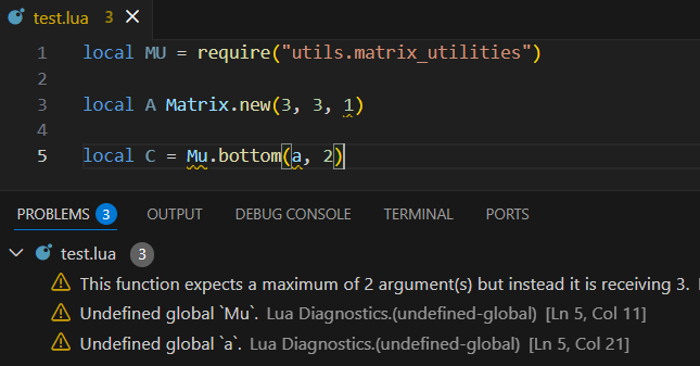
Example of error and warning highlighting in Visual Studio Code.
Summary
In larger projects, when modules are located in different folders, and perhaps authored by different people, it can be easy to mix up names, function argument orders and types etc. With Intelisense, such mistakes can be detected and highlighted as you write the code, which can save a lot of time and effort in debugging later on.
The definition files also serve as a form of documentation and some language servers can even export the documentation as versatile JSON files. Expect more additions in the form of modules and packages in the future, and refinement of the definition files as well.